What AI Can Do: The Real Capabilities Behind the Hype
AI can write, summarize, predict, recommend, classify, automate, and generate at impressive speed. But those capabilities are not without limitations. Understanding what AI can actually do, and where it still needs human judgment, is how you move from confused observer to confident user.
Key Takeaways
TL;DR
Key Article Navigation
Table of Contents
- What AI Can Actually Do
- AI Can Recognize Patterns and Make Predictions
- AI Can Generate Content
- AI Can Understand and Work With Language
- AI Can Automate Repetitive Work
- AI Can Analyze Data and Support Decisions
- AI Can Interpret Images, Audio, and Video
- What These Capabilities Have in Common
- What AI Still Cannot Do Well
- Final Takeaway
- FAQ
AI is everywhere, but the phrase “AI can do that” has become almost useless without context.
Sometimes it means AI can summarize a document. Sometimes it means AI can recommend a product. Sometimes it means AI can generate an image, flag fraud, draft code, translate text, detect patterns, or predict equipment failure before it happens.
Those are very different capabilities.
This article breaks down what AI can actually do today in plain English. Not the sci-fi version. Not the investor-pitch version. The useful version: what AI is genuinely good at, where it shows up in everyday tools, and where human judgment still needs to stay in charge.
The goal is simple: help you understand AI’s real capabilities without turning this into a technical manual nobody asked to be trapped inside.
What can AI actually do?
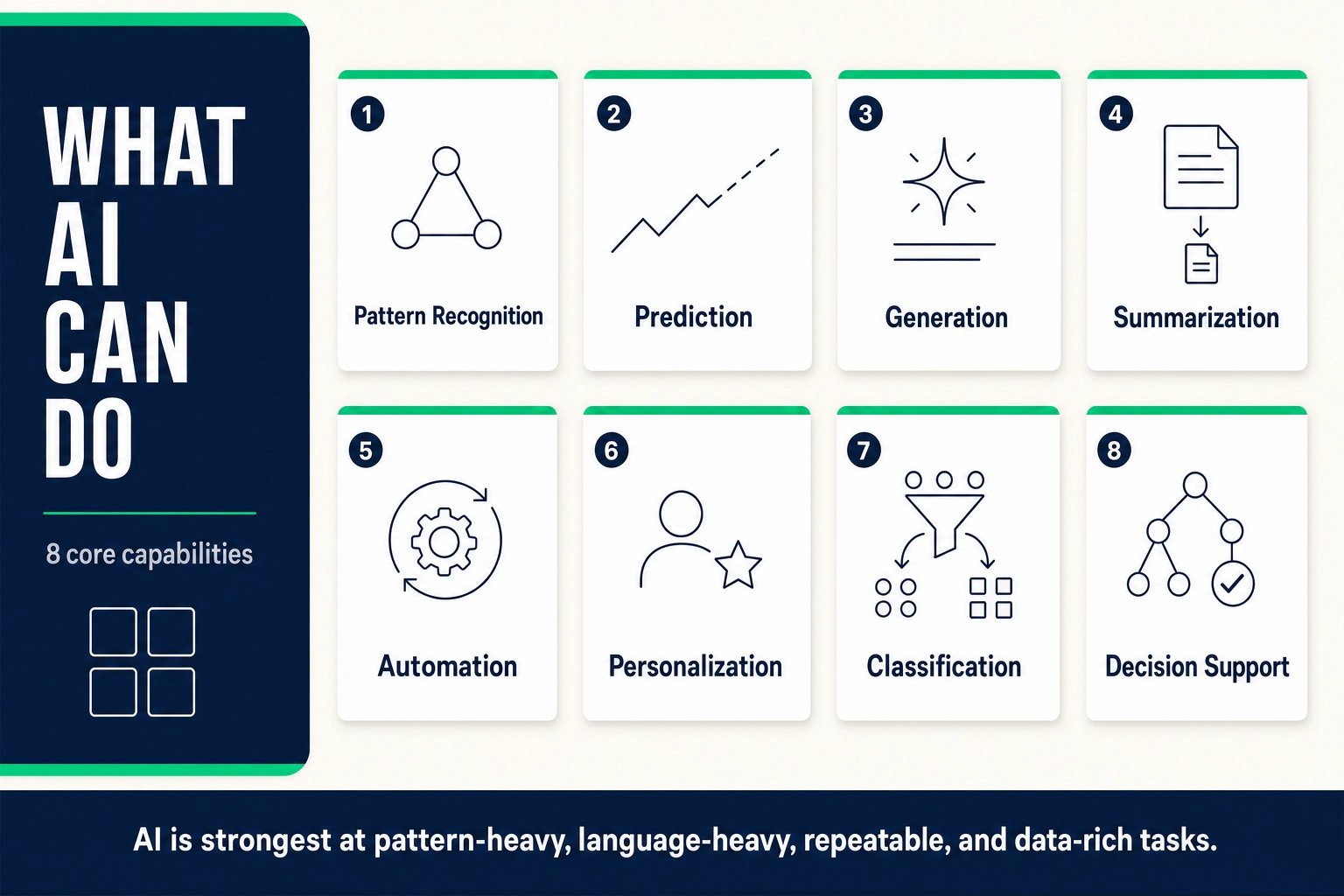
AI can recognize patterns, make predictions, generate content, process language, classify information, personalize experiences, automate repetitive work, analyze data, support decisions, and interpret images, audio, and video.
What it cannot do is truly understand meaning, feel emotions, make ethical judgments, or take responsibility for outcomes. That difference matters.
What AI Can Actually Do
AI is not one single capability. It is a bundle of systems and techniques that can perform specific types of work: spotting patterns, predicting outcomes, generating content, processing language, automating routine tasks, and analyzing information at scale.
Most real-world AI tools combine several of these capabilities. A customer support chatbot, for example, may understand a user’s question, classify the issue, retrieve relevant information, generate a response, and route the conversation to a human if the problem is too complex. A recommendation engine may analyze your past behavior, compare it with millions of other users, and predict what you are likely to watch, buy, or click next.
That is why “AI can do this” needs more detail. The useful question is not whether AI can do something in theory. The useful question is what kind of task it is, what data the system has learned from, how reliable the output needs to be, and whether a human should review it before anything important happens.
The table below gives you the cleanest version of the map.
| Capability | What It Means | Everyday Example |
|---|---|---|
| Pattern recognition | Finds relationships in data, language, images, behavior, or records. | Fraud detection, spam filtering, medical image review. |
| Prediction | Uses past patterns to estimate likely outcomes. | Netflix recommendations, traffic estimates, demand forecasts. |
| Generation | Creates new text, images, code, audio, or video from a prompt. | Drafting emails, creating images, writing code snippets. |
| Language processing | Reads, summarizes, translates, rewrites, or answers questions about text. | Meeting summaries, translation tools, document chat. |
| Automation | Handles structured, repeatable tasks without constant human input. | Ticket routing, form processing, report generation. |
| Data analysis | Finds trends, anomalies, themes, and insights in large datasets. | Survey analysis, sales trends, operational dashboards. |
AI Can Recognize Patterns and Make Predictions
Pattern recognition is the foundation of most AI capabilities. AI systems learn from examples, then identify similar patterns in new data.
That is how a spam filter learns what junk mail looks like. It is how a fraud detection system spots suspicious activity. It is how a medical imaging system can flag visual patterns that may deserve a closer look. It is also how recommendation engines decide what you are likely to want next.
Prediction is pattern recognition pointed toward the future. AI looks at past behavior or historical data and estimates what is likely to happen next. That might mean predicting which customer may cancel, which machine may fail, which product may sell, or which route may be fastest.
This is powerful because AI can process more examples than any human team could reasonably review manually. But it is also limited. AI predictions are only as useful as the data behind them. If the data is biased, outdated, incomplete, or no longer reflects reality, the prediction can be wrong with excellent posture and a confident little bow.
AI predictions are probabilities, not guarantees. They are strongest when the data is relevant, current, and representative. When the world changes or the data is biased, the prediction can be confidently wrong.
AI Can Generate Content
Generative AI is the capability most people now associate with AI: writing text, creating images, producing code, generating audio, and increasingly creating video from prompts. This is useful because it reduces the friction of starting. A blank page becomes a draft. A vague idea becomes a few options. A technical problem becomes a first pass at code. A design concept becomes something visual enough to react to.
But generation is not the same as truth, strategy, or taste. AI can draft an email, but it does not know your relationship with the person receiving it. It can generate a product description, but it may invent features if you do not give it the right source information. It can write code, but the code still needs testing.
The best way to use generative AI is as a fast starting point, not the final authority. It is excellent at producing options. Humans still decide what is accurate, appropriate, useful, and worth publishing.
Generative AI in Practice
A marketing team asks AI for ten social post variations based on a product brief. The AI drafts them in seconds. The team edits two, combines ideas from another, and discards the rest.
That is the right use case: fast starting points, not finished strategy.
AI Can Understand and Work With Language
A huge amount of modern work happens in language: emails, reports, documents, meetings, instructions, notes, feedback, and presentations. That is why language AI feels so immediately useful.
AI can summarize long documents, translate text, rewrite drafts, answer questions about uploaded files, pull out action items from meeting transcripts, and adjust tone for different audiences. It can turn a messy paragraph into a cleaner explanation or a long report into a short executive summary.
This does not mean AI understands language the way people do. It processes patterns in text. It can produce an answer that sounds fluent and still miss the point, change the meaning, or include information that is simply wrong.
The practical takeaway: use AI to move faster through language-heavy work, but review anything that requires precision, nuance, or factual accuracy.
AI can sound polished while being wrong. Language fluency is not the same as factual accuracy. Use AI to draft, summarize, and explain, but verify claims before you rely on them.
AI Can Automate Repetitive Work
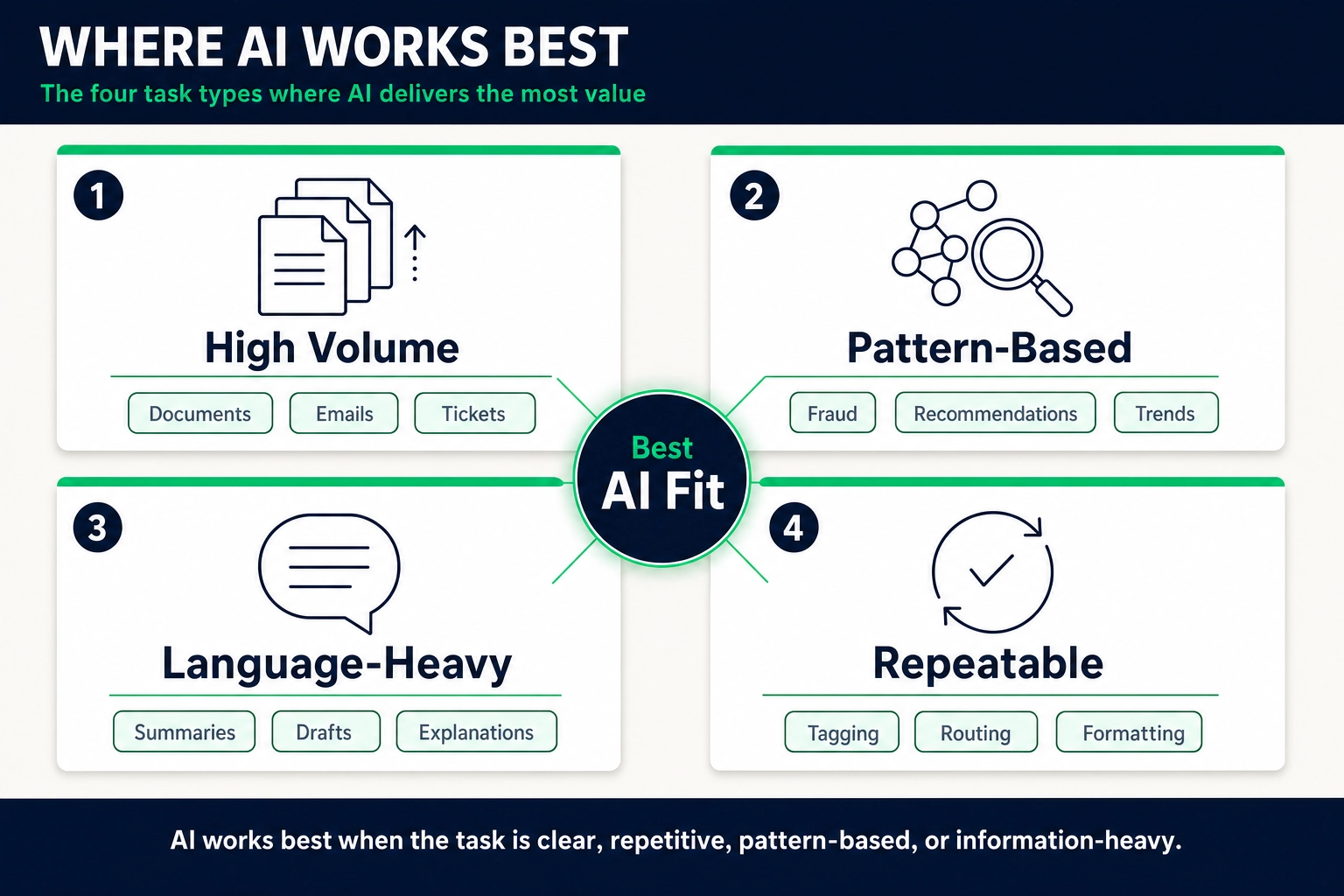
AI is especially useful when work is repetitive, structured, and easy to verify.
That includes tasks like sorting support tickets, extracting information from forms, drafting routine replies, summarizing meetings, categorizing emails, generating standard reports, monitoring dashboards, and flagging anomalies for review.
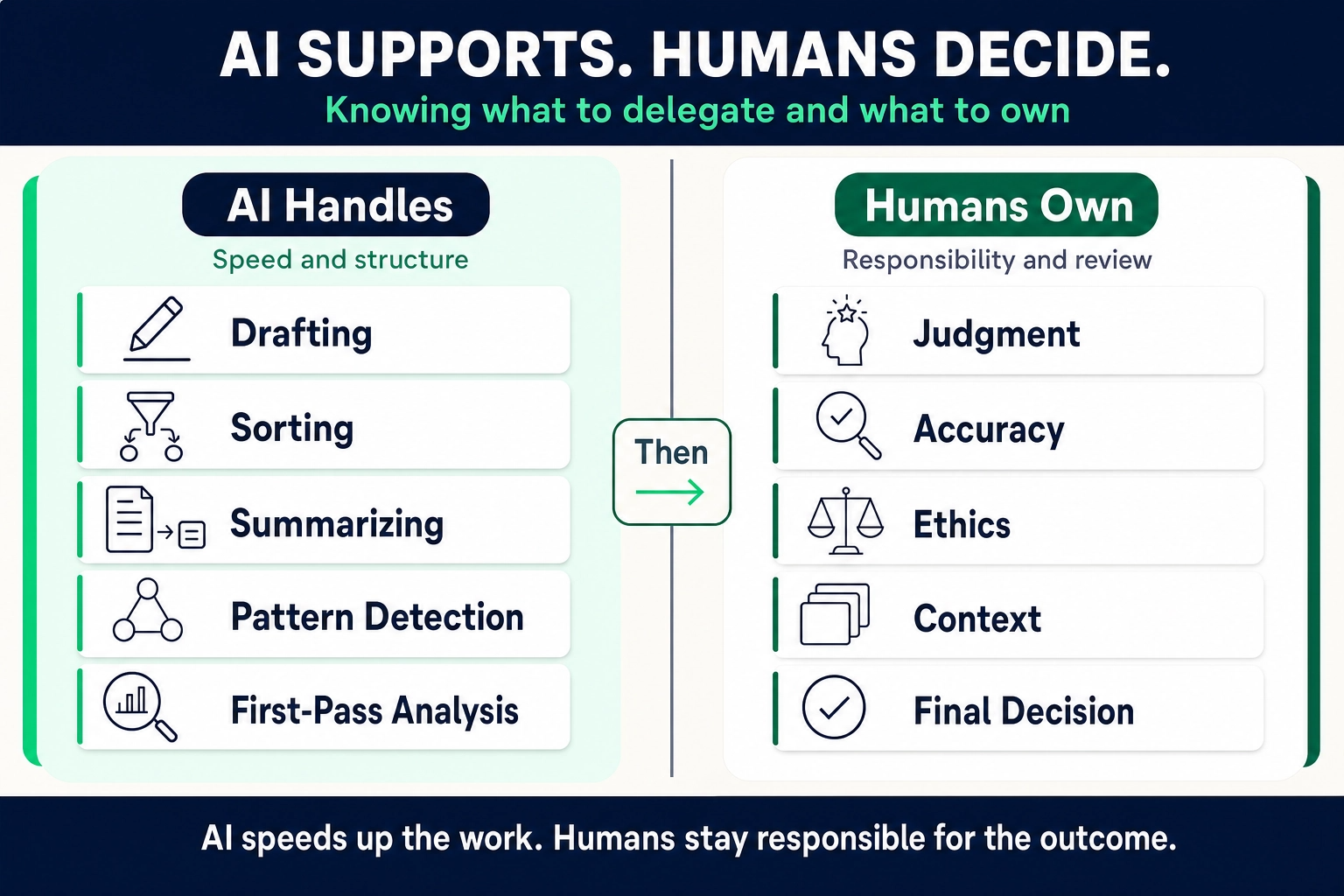
The best AI automation does not remove humans from every process. It removes unnecessary manual effort from the parts of the process that are predictable. AI handles the first pass. A person reviews the output, approves the decision, or steps in when the task requires judgment.
This is where AI becomes practical instead of flashy. It saves time not by replacing all work, but by trimming the repetitive parts that eat attention without needing much thought.
Good Tasks for AI Automation
AI automation works best when the task is clear, frequent, and easy to review.
- The task happens often
- The steps are predictable
- The input is structured or easy to categorize
- Errors are easy to catch
- A human can review the output
- The task does not require emotional judgment
- The consequences of mistakes are manageable
AI Can Analyze Data and Support Decisions
AI can process large amounts of information quickly, which makes it useful for analysis. It can summarize datasets, identify trends, detect anomalies, group similar responses, and turn messy information into something easier to understand.
This is useful in business, healthcare, operations, finance, research, marketing, and almost any field where people are drowning in dashboards, spreadsheets, reports, and feedback.
AI can also support decisions by organizing information, ranking options, identifying risks, and suggesting possible next steps. But support is the key word. AI should not own high-stakes decisions, especially decisions that affect people’s health, money, jobs, rights, or safety.
Think of AI as a decision-support tool, not a decision-maker. It can help you see more clearly. It cannot take responsibility for what you choose.
AI Can Support
- Summarizing information
- Ranking options
- Finding patterns
- Flagging risks
- Creating scenarios
Humans Must Own
- Ethical decisions
- Final judgment
- Accountability
- Context-heavy choices
- Decisions that affect people

AI Can Interpret Images, Audio, and Video
AI is not limited to text and numbers. It can also work with images, speech, sound, and video.
Computer vision systems can identify objects in photos, detect defects in manufacturing, read text from images, support medical image review, and analyze video footage for specific events. Audio AI can transcribe speech, identify speakers, translate spoken language, and detect certain sounds.
These capabilities show up in tools people already use: phone cameras, accessibility features, security systems, medical imaging tools, smart assistants, transcription apps, and visual search.
The same rule still applies. AI can interpret media based on patterns it has learned. It does not understand the world the way a person does. So the more serious the use case, the more human review matters.
What These Capabilities Have in Common
Most AI capabilities come back to the same basic idea: AI learns patterns from data and applies those patterns to new inputs.
That is what powers prediction. That is what powers classification. That is what powers image recognition, language generation, personalization, automation, and many forms of analysis.
This explains why AI can be so useful. It can process more examples, more documents, more images, more transactions, and more signals than humans can manually handle.
It also explains why AI fails. If the data is biased, incomplete, outdated, or missing important context, the output can be weak or wrong. If the task requires lived experience, ethical judgment, emotional intelligence, or accountability, pattern matching is not enough.
AI is powerful because it scales pattern processing. It is limited because pattern processing is not the same as understanding.
AI is not powerful because it thinks like a human. It is powerful because it can process patterns, information, and tasks at a scale no human team could match manually.
What AI Still Cannot Do Well
AI’s capabilities are real, but they are not unlimited.
AI does not truly understand meaning. It does not feel emotions. It does not have values, common sense, or lived experience. It cannot take responsibility for an outcome. And it can generate confident, polished answers that are factually wrong.
That does not make AI useless. It makes AI a tool, not a mind.
The more important the task, the more oversight matters. Use AI to draft, summarize, analyze, classify, and support. Keep humans responsible for judgment, ethics, context, and accountability.
For a deeper look at where AI falls short, read the companion article on what AI still cannot do.
"AI understands me."
AI can respond in a way that feels conversational, but it does not understand your situation the way another person would. Clear context still matters.
"AI checked if this is true."
AI does not automatically verify claims against a trusted source. Confident answers can still be wrong.
"AI can make the final decision."
AI can support decisions, but high-stakes judgment and accountability need to stay human.
"AI gets better every time I use it."
Some systems learn from feedback, but many tools do not improve based on your individual use. Do not assume the tool remembers or adapts unless it says so.
Final Takeaway
AI can do a lot. It can recognize patterns, generate content, summarize information, automate repetitive work, analyze data, support decisions, and interpret media.
That is useful. It is also not magic.
The smartest way to use AI is to match the tool to the task. Let AI handle the parts where speed, scale, pattern recognition, and structured output matter. Keep humans in charge of meaning, judgment, ethics, creativity, and accountability.
AI is not here to think for you. It is here to help you work with information faster, if you know how to use it well.
FAQs
Frequently Asked Questions
What can AI do?
AI can recognize patterns in data, generate content, summarize information, make predictions, automate repetitive tasks, personalize experiences, process language, support decision-making, and help people learn. These capabilities work by identifying patterns in training data and applying them to new inputs — not through human-like understanding.
What is AI best at?
AI is strongest at tasks involving large volumes of data, pattern recognition, repetition, prediction, summarization, content generation, and structured workflows. It performs best when inputs are clear, context is strong, and outputs can be reviewed by a human.
Can AI create content?
Yes. Generative AI can produce text, images, code, audio, video, summaries, outlines, and designs. However, AI-generated content should be reviewed for accuracy, tone, originality, and quality before it is treated as finished. AI creates based on patterns, not understanding — which means it can produce polished output that is still factually wrong or poorly reasoned.
Can AI make decisions?
AI can support decision-making by organizing information, identifying patterns, comparing options, and surfacing risks. But humans should remain responsible for important decisions — especially in high-stakes areas like healthcare, hiring, finance, law, and safety. AI can help structure the decision. It should not be treated as the decision-maker.
Can AI understand language?
AI can process and generate language very effectively, but it does not understand meaning the way humans do. Large language models identify patterns in text and produce responses based on training data and context. This makes AI useful for language tasks, but it also means confident-sounding output can still be inaccurate. Always verify important claims.
How should beginners think about AI capabilities?
Think of AI as a capable assistant for pattern-based tasks: drafting, summarizing, analyzing, predicting, organizing, and automating. It is useful when given clear instructions and good context. It still needs human guidance, verification, and judgment — especially when the stakes are high or the topic is nuanced.